


Directory structure in OS
Directory Structure in OS: Overview
In this article, we will delve into the Directory Structure in Operating Systems (OS) and its significance in organizing and retrieving files. We'll explore what a directory is and how it stores related files. Additionally, we'll discuss the operations that can be performed on directories and understand the different directory structures in OS that can help the user utilize the structure that best suits their requirements.
What is the Directory Structure in OS?
A directory is a container that stores files and folders, organizing them hierarchically. The Directory Structure in OS manages directory entries of files, including file names, locations, protection info, and more. This structure enables efficient file retrieval.
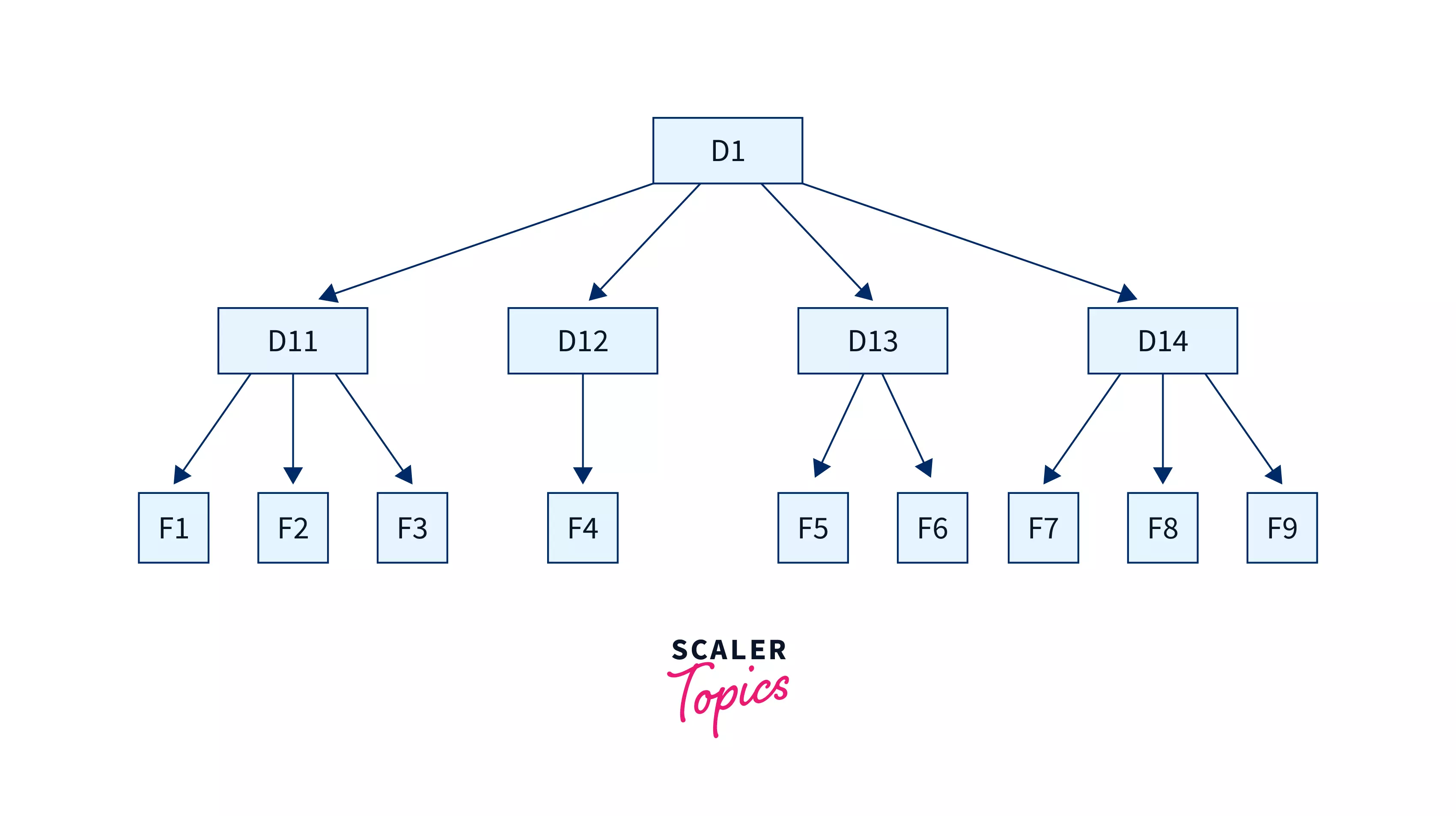
Points to Consider while Maintaining a Directory Structure in an Operating System:
-
Users should be able to choose file names without restrictions, promoting flexibility.
-
Collaboration is enhanced by allowing users to share and access files created by others.
Operations in Directory Structure in OS
-
Creating: Users can create new files and directories, providing unique names for directories.
-
Searching: Users can search for specific files or directories within a directory.
-
Deleting: Unwanted files or empty directories can be deleted.
-
Listing: Users can retrieve a list of files in a directory. Renaming: Files and directories can be renamed to reflect content changes.
-
Linking: Files can be linked to appear in multiple directories.
-
Unlinking: Removing links from files in multiple directories.
Directory Structure in OS is a fundamental aspect of file management and ensuring efficient access in an operating system.
The Logical Directory Structures in OS
We have mainly five different types of directory structures in OS. Given below are all the five different directory structures and their sets of advantages and disadvantages along with pictorial representation to dive deeper:
The Single-Level Directory Structure
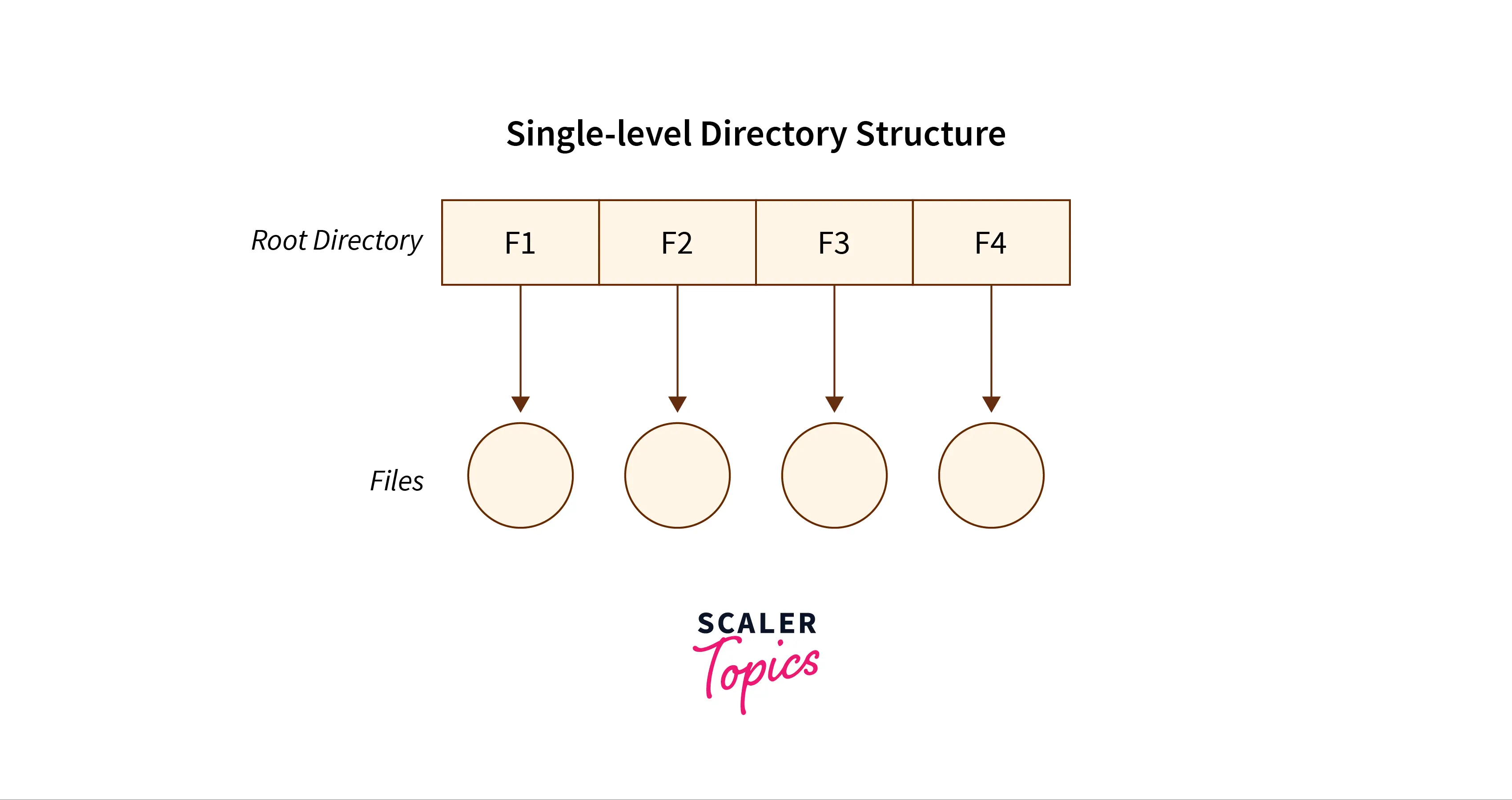
The single-level directory structure is the simplest and easiest directory structure out of all the other directories. In this model, only one directory is present, making it the simplest directory structure. All the folders/files are contained under the same directory which is called the root directory. The single-level directory structure keeps all files in a single root, with no separate directory present for grouping, which makes it easy to support and understand.
Now as the different files are under the same-root directory the users are not allowed to create the different sub-directories serving their requirements. This also creates a barrier with the single-level directory as when the number of files increases or more than one user logs into the system both of these need to maintain the standards of giving a unique name to it. Because there is only one directory for everyone, this model is unsuitable for multi user systems as files increase. This also means that if two users call their files ‘apple’, then this, in turn, will violate the unique name standardization.
Below is the pictorial representation of The Single-level directory structure in OS :
The Advantages
-
The implementation of a single-level directory structure is simple and easier as compared to other directory structures in OS.
-
If the file size is smaller, then the searching of such files with the single-level directory structure becomes simpler.
-
The single-level directory structure allows the operations such as searching, creation, deletion and updating as well.
The Disadvantages
-
As several users can log in at the same system to log their files maintaining a unique name becomes difficult leading to a collision. This also means that if the file with the same name is created then the old file will get destroyed first, then the new file (having the same name ) created will replace it.
-
If the size of the files is bigger then searching the files in one root directory of the single-level directory structure will become time-consuming and hence difficult.
-
The single-level directory structure restricts the grouping of the same type of files together.
Transform Your Career
Choose from our industry-leading programs designed for career success
Modern Software and AI Engineering Program
Master full-stack development with AI integration


 +1000 more
Modern Data Science and ML with specialisation in AI
Advanced data science techniques with AI specialization
+1000 moreAdvanced AIML with Specialisation in Agentic AI
Deep dive into AIML with focus on Agentic systems
+1000 moreDevOps, Cloud & AI Platform Engineering
Build and manage AI-powered cloud infrastructure
+1000 moreAI Engineering Advanced Certification by IIT-Roorkee
Premier AI engineering certification from IIT-Roorkee

The Two-Level Directory Structure
Overcoming the drawbacks posed by the single-level directory structure, i.e., the confusion created by the same file names given by several users - The Two-level directory structure in OS came into the picture.
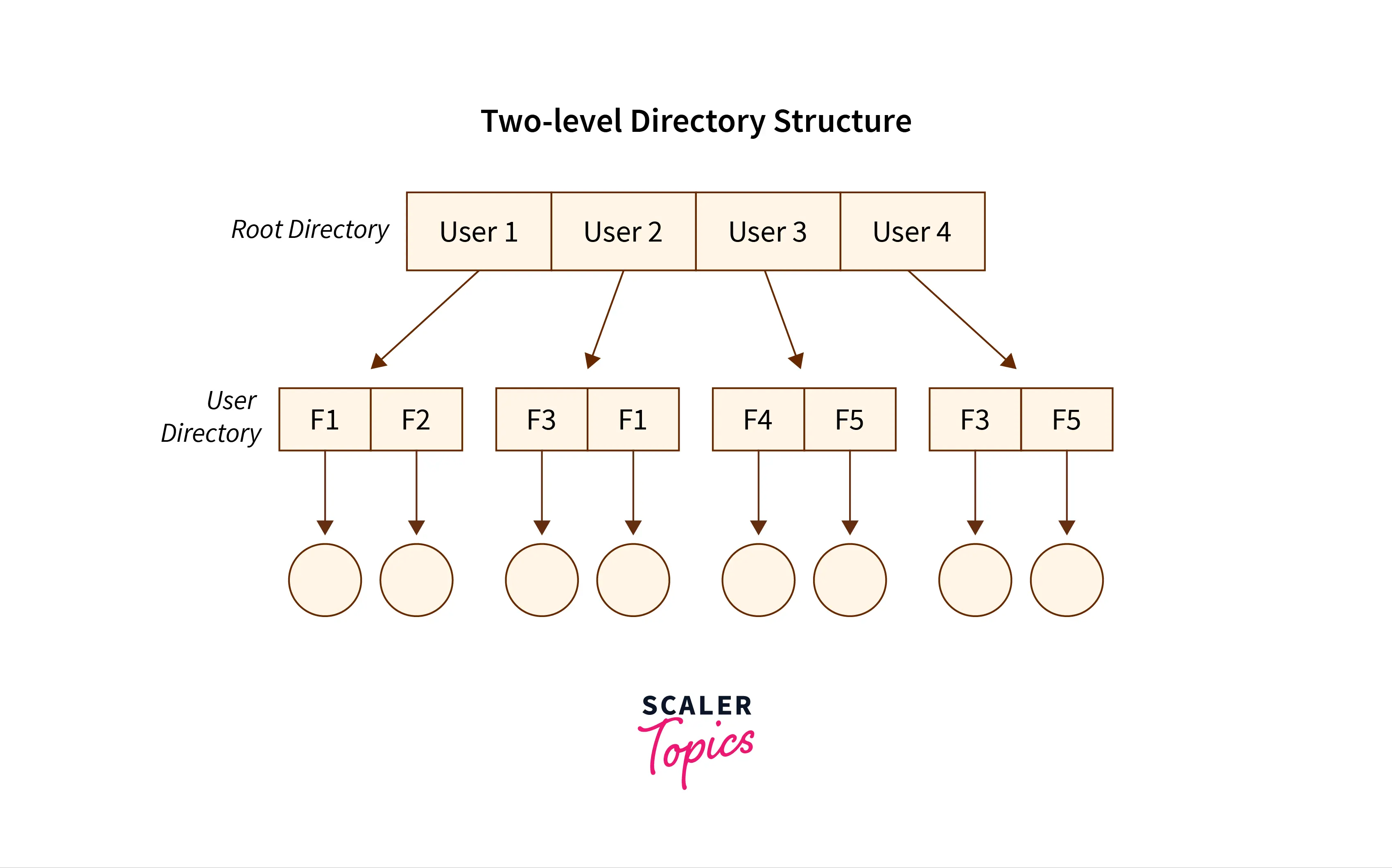
The two-level directory structure in OS offers a unique solution to the problem caused by single-level that is, this directory structure gives each user the right to have their own separate directory, commonly called User File Directory(UFD). The User File Directory or UFD has a similar structure as that of the single level, but each UFD lists only the files of a single user who owns that own directory. To root all the UFDs, the system's master file directory or Master File Directory (MFD) stores entries for users' UFDs and is searched whenever a new user id’s logged into the directory structure.
This can also be defined as the two-level directory structure in OS which gives each of its users the right to create a directory directly inside the root directory. Here the directories created by the user are called the UFDs, where users can store files but cannot create subdirectories inside it, and to check who logged in as a user the Master File Directory or MFDs are responsible for the same.
Here the MFDs are indexed by username or account number which are pointed to the UFDs with each entry point of the user. In a two-level directory structure searching files becomes, even more, easier as there is only one user's list, which is required to be traversed along with having a pathname for each file such as /User-name/directory-name/ which is also defined here.
Below is the pictorial representation of The Two-level directory structure in OS :
The Advantages:
-
In the two-level directory structure in OS different users have the right to have the same directory as well as a file name as the user has its own USD which can give a filename that can match other users but won't cause an issue.
-
We can also see that searching for files become much simpler.
-
As we have a user-defined directory this also provides privacy related to files stored as no user can enter the other user's directory without permission.
-
In a two-level directory structure we cannot group the files which are having the same name into a single directory for a specific user.
The Disadvantages:
-
In a two-level directory structure a user is not allowed to share files with multiple users.
-
We also find that scalability is not present in a two-level directory structure as two files of the same type cannot be grouped together in the same user.
-
Here users cannot create subdirectories; only one user file directory can be defined under one master file directory.
The Tree-Structured Directory Structure
As observed in the two-level directory structure in OS the drawback of users not having the ability to create sub-directories is resolved with The Tree-structured directory structure in OS coming into the picture.
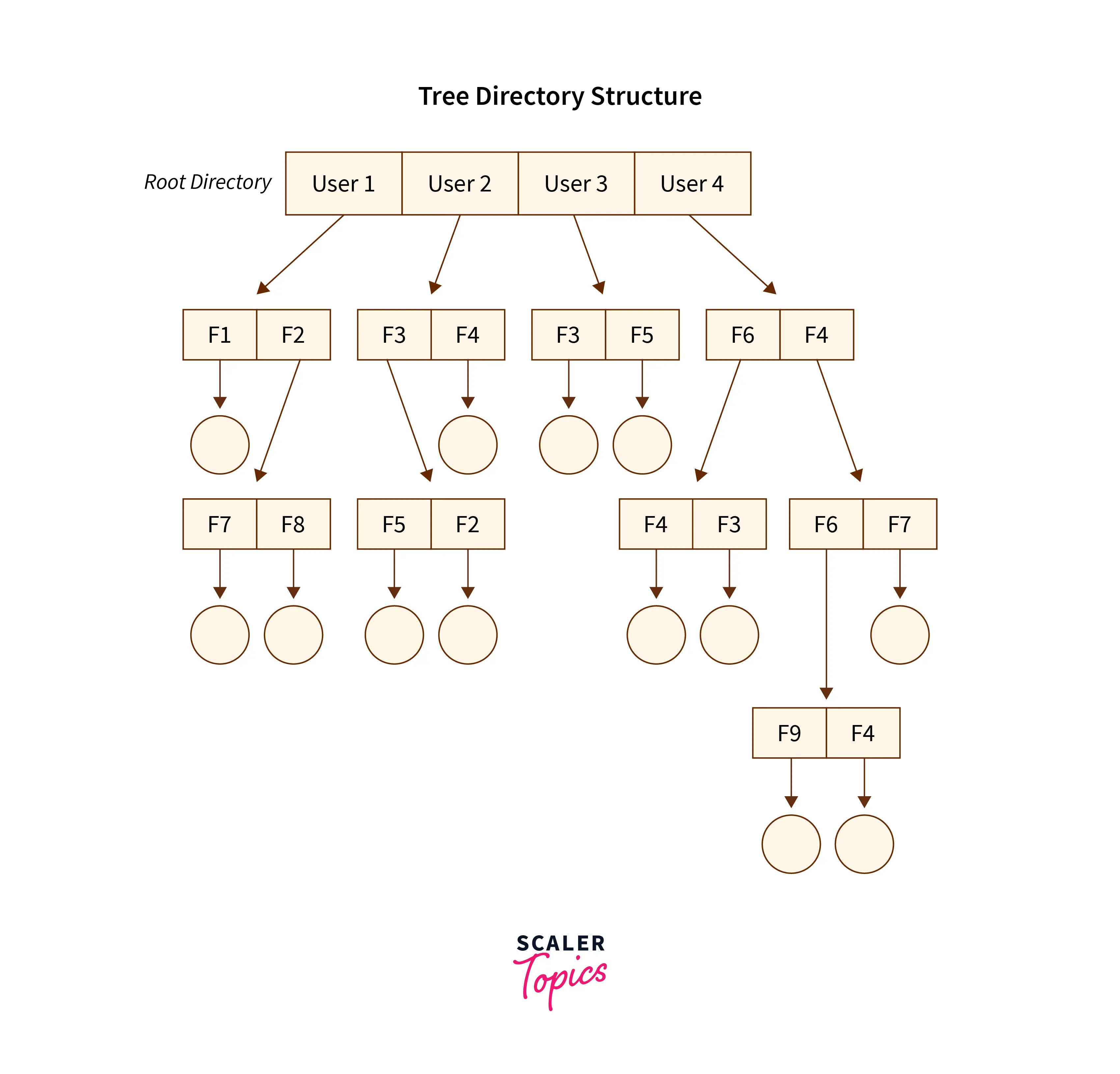
The Tree-Structured directory structure in OS is said to be the most common hierarchical structure used by modern operating systems, as it gives users the capability to create sub-directories under their defined directory. Here we have the natural generalization which extends the hierarchical organization of directories and files to a tree of arbitrary height whereas, in the case of two-level, it was the tree of two heights. This generalization in tree structure allows the user the ability to create their own subdirectories, create files within them, and organize their files accordingly.
The tree-structured directory structure has separate parent directories for the sub-directories owned by each of their specific users and the parent directories of the users are all under a single root directory, which makes it a tree structure. This helps in total separation between the users which provides complete naming freedom and privacy to users’ information.
The system administrator/ UFD admin only has full access to the root directory. In the Tree-structured directory structure searching is quite effective where we use the current working concept that is the operating system maintains this hierarchy for navigation and access, and we can access the file by using two kinds of paths that are either absolute or relative.
Below is the pictorial representation of The Tree-structured directory structure in OS :
The Advantages:
-
In the Tree-structured directory structure searching is quite effective where we use the current working concept that is we can access the file by using two kinds of paths that are either absolute or relative.
-
Here we can group the same type of files into one directory.
-
In this directory structure the chances of collision of names/types etc are less and hence we can say that the directory structure in OS is scalable.
Turn Learning into Career Growth
The Disadvantages:
-
In the tree-structure directory structure in OS the files cannot be shared between users. Also, the users cannot modify/update the root directory of other users.
-
This directory structure in OS as we have to go under multiple directories to access a file we can say that it is said to be inefficient.
-
Here each file does not fit into the hierarchal model and so we have to save the files into multiple directories.
The Acyclic Graph Directory Structure
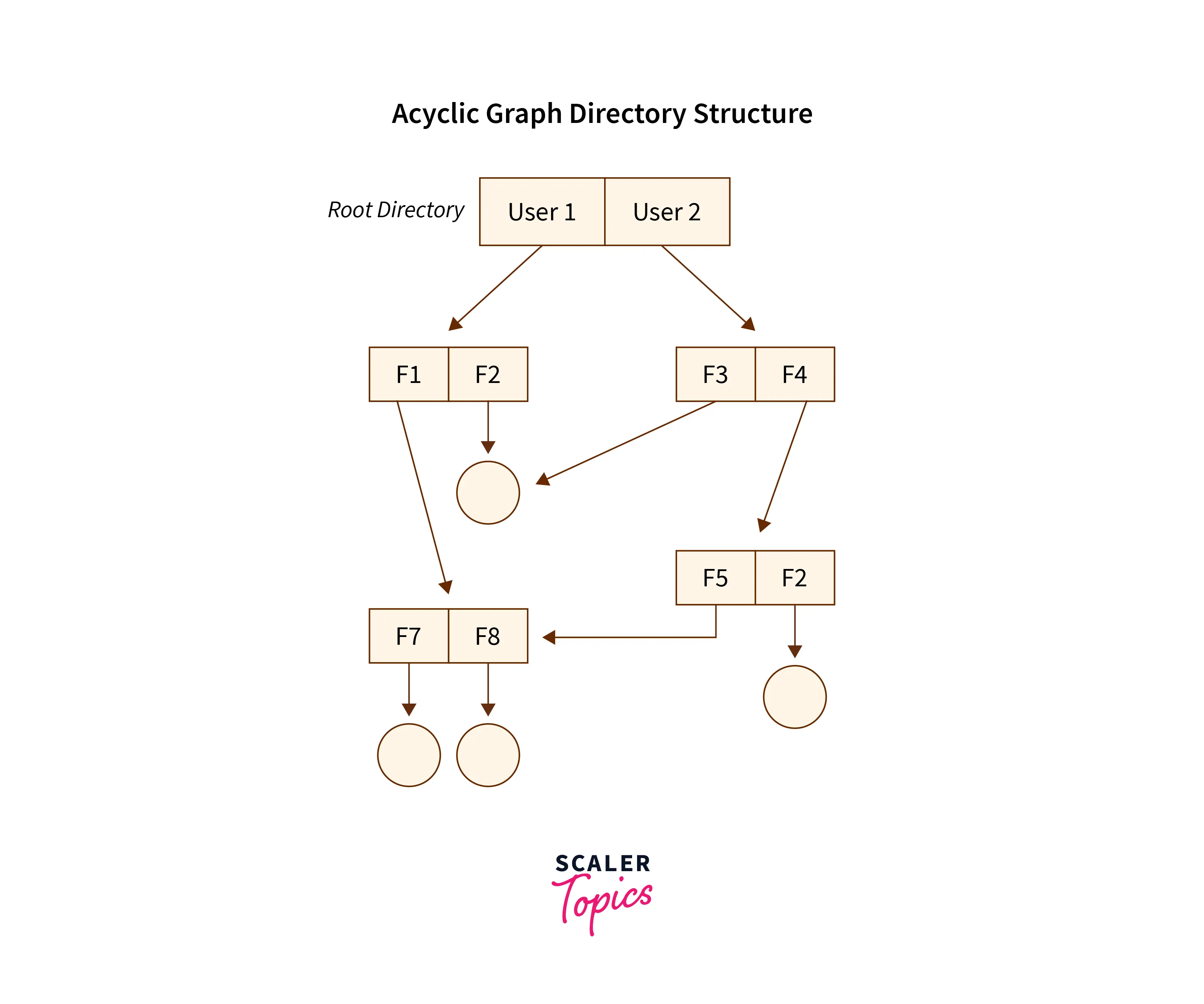
Overcoming the drawbacks posed by the tree-structured directory structure,i.e, the restriction that it cannot have multiple parent directories and also cannot share files between users - The Acyclic Graph directory structure in OS came into the picture, where the shared file physically resides on the storage device while links reference it from multiple locations.
In the Acyclic Graph directory structure in OS can be defined as the directory structure that allows a directory or a file to have multiple parent directories so that it supports file sharing, and a particular file can appear through different linked paths without duplication in other user directories which have access to that shared file via the links provided to them. It is often said to be a natural generalization of the tree-structured directory, though access control is required when such shared resources are linked across users.
Mostly, this is used in situations such as, when two users or two programmers are collaborating on a project and they need to access the files. So we have the associated files which are stored in a subdirectory mostly separated from other projects and files of other programmers/users. Now as they are working on a joint project they want shared access to start from the master directory into their own directories. Therefore these common sub-directories where two or more users can collaborate would be shared so that the files can be stored in their individual locations and this is where we use Acyclic directories.
There must be a point noted here that the shared file is not the exact copy file, that is if any programmer/user makes some changes in the sub-directory that change will be reflected for both the users. Here we can (with the help of aliases or links) create the acyclic type of directory graph where we can also provide different paths to the same file. We define the Links into two kinds, popularly known as The Hard Link and The Symbolic Link.
a. The Hard Link: This is also called as the physical link. If we want to delete the files in the acyclic graph directory structures then we need to remove the actual files only if all the references to the files are deleted that is, no link that even references the main file should be established. Here we don’t leave a suspended link.
b. The Symbolic/Soft-Link: This is also called as the logical link. If we want to delete the files in the acyclic graph directory structures then we need to simply delete the files and need to keep in mind that only a dangling/ hanging point is left. Here we leave a suspended link.
Below is the pictorial representation of The Acyclic graph directory structure in OS :
Scaler Placement Report and Statistics
Scaler learners achieved 2.5x salary growth with average post-Scaler CTC reaching ₹23L.
The Advantages:
-
In the Acyclic Graph directory structure in OS we can share files between users.
-
Here we can search the files easily as compared to the tree-structured directory structure as here we have different-different paths to one file.
The Disadvantages:
- In the Acyclic Graph directory structure in OS as we can share the files via linking, so there are chances that in the case when we want to delete a file in a directory it may create a problem. a. Also, even if the link is a soft link then after deleting the file we are left with a dangling/suspended point of the link. b. But in the case of hardlink, when we delete a file we have to vanish all the references associated with it, which can lead to issues associated with referring back to files in case a requirement arises.
The General Graph Directory Structure
As observed in the acyclic-graph directory structure in OS the drawback of links that are established and need to be either terminated or suspended to reach the files/directory is resolved with The General Graph directory structure in OS taking a vital place in the different types of a directory structure in OS.
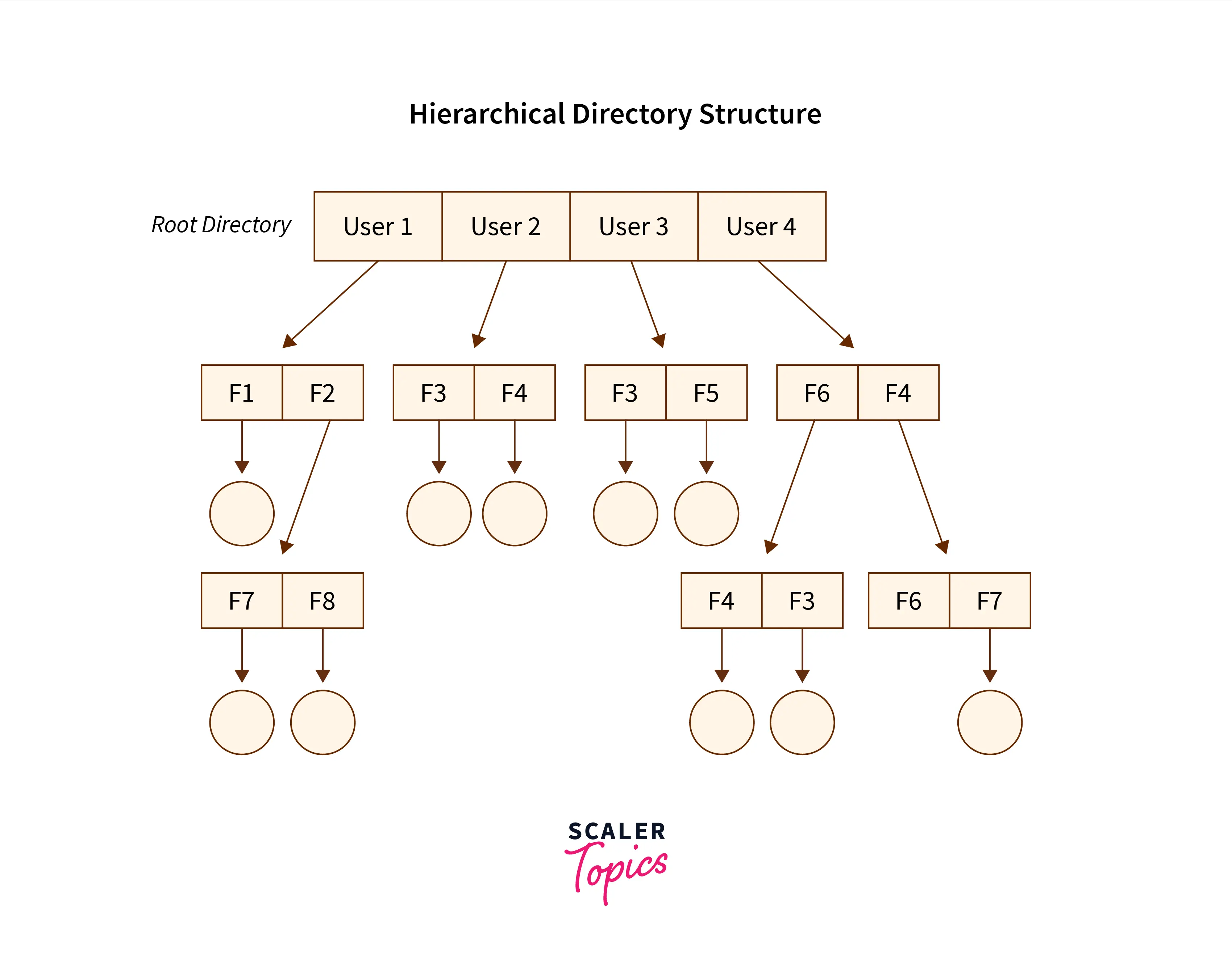
In the General Graph directory structure in OS users have the capability to create a cycle of the directory within a directory, and as shown in the above image, we have the power to derive the various directories with the help of more than one parent directory in operating systems. In this type of structure, the users are free to create directories under the root directory along with creating sub-directories under the same structure, which can also hold true if the users want to create multiple sub-directories, that is, the users are free to organize files through different linked sub-directories for different file types.
Adding to the above, With the help of the file paths if the users feel the need to access the location of the files then that is made possible by the General Graph Directory Structure. In this structure, the file paths or paths can be categorized into two broad categories to locate the files in the directory structure as below :
-
The Absolute Path: Here, the path of the desired files can be determined by considering the root directory as the base directory.
-
The Relative Path: Here, the path of the desired files can be determined by considering the user’s directory as the base directory, or by using the file’s own directory as the base.
Below is the pictorial representation of The General Graph directory structure in OS :
The Advantages:
-
The General Graph directory structure allows the cycle or creation of a directory within a directory.
-
This directory structure is known to be a flexible version compared to other directory structures.
The Disadvantages:
-
The main issue that can overpower this structure is to calculate the total size or space that the directories will take up.
-
As this directory structure allows the creation of multiple sub-directories a lot of garbage collection can be required.
-
If compared to the other directory structure in OS the General Graph directory structure is a costly structure to be chosen.
Conclusion
-
The Single-level directory structure in OS is the simplest and easiest directory as all the files are under one directory specifically the root directory.
-
The Two-level directory structure in OS gives each of its users the right to create a directory directly inside the root directory.
-
In the Tree-Structured directory structure in OS among users it gives the users the capability to create sub-directories under their defined directory, which helps form a well designed directory structure.
-
In the Acyclic Graph directory structure in OS can be defined as the directory structure that allows a directory or a file to have multiple parent directories
-
In the General Graph directory structure in OS users have the capability to create a cycle of the directory within a directory
 Google
 Amazon
 Microsoft
 Flipkart
 Adobe1200+ more